How I use AI for Marketing
I’ve been doubling down on my use of AI to build marketing tools, websites, and to automate tasks. I love using tools like ChatGPT because they’re super helpful when I’m trying to push an idea out or if I need a thinking partner to help me come up with new social posts. However, I believe we still need one hand on the wheel and remember that with great power, comes great responsibility.
Many of my roles have blended a wide range of marketing skills like email, social media, data analysis, web development, and so on. I love this type of role because I’m forced to know what’s going on in multiple areas of marketing which gives me fresh ideas to bring to the table. Unfortunately the day to day tasks and the more in the weeds projects tend to slow me down. That’s where AI comes in!
TLDR
I use AI in a variety of different ways for my daily marketing tasks. These are some of the recent projects that highlight how I pair my coding skills and my marketing experience with AI.
- Data Cleanup
- YouTube Scraping
- Building an Inventory Management System
- Lighthouse Script
- Attribution Using First Party Cookie
Data Cleanup
The Issue
I was working through my yearly marketing plan and reviewing data from the previous year’s campaigns. I was so frustrated because each vendor (we work with several) uses their own custom dashboards, they send one off emails with data, and they all report on KPIs just a little bit differently.
If only there was a way to take all this data and clean it up. That’s when the lightbulb went off and I started planning how I could use my coding knowledge and AI to help me build a script to clean my data.
The Solution
First, I created a Google Sheet and thought about how I want to store the data in a format that makes sense to me. Things like column headers, caps vs lowercase, underscores vs dashes, and other small details that will make a big impact.
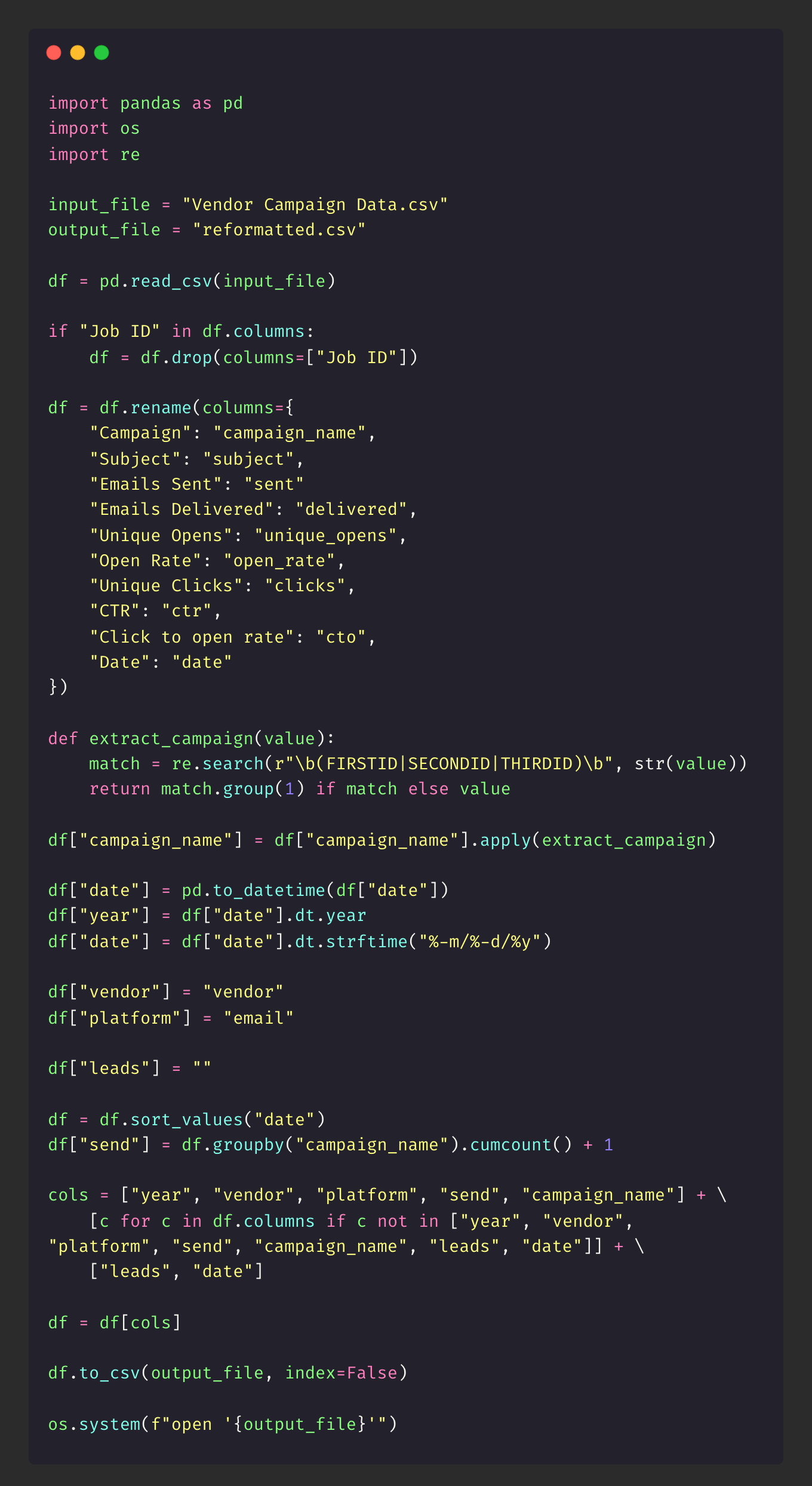
Next, I knew I wanted to use Python and Pandas so I started with some basic code like importing libraries and setting some basics up. After that I started brainstorming how I would go about cleaning the data with ChatGPT and Claude.
Below is the script in case you want to use it for your own needs but the data-cleaner repo is also on my GitHub. While this script works for me as is, you’ll most likely need to play around with it until it fits your formatting needs. Or, you can use this as inspiration to make your own script from scratch.
The Result
I now have a script that will save me hours, if not days, sifting through data and trying to manually clean it up for analysis. This whole process took me about 2 days to plan, build, and test the script and it was totally worth my time because now I have something I can reuse every year when I’m reviewing campaign results.
Could I spend days, weeks, maybe months building a script myself without AI? Yes, but as a marketer who wears many different hats, I needed to move quickly.
YouTube Scraping
The Issue
I recently had a client ask me for a way to pull in titles, publish dates, and video links into an excel file for their marketing team. I never scraped before but I had a pretty good idea where to start due to my previous coding experience.
The Solution
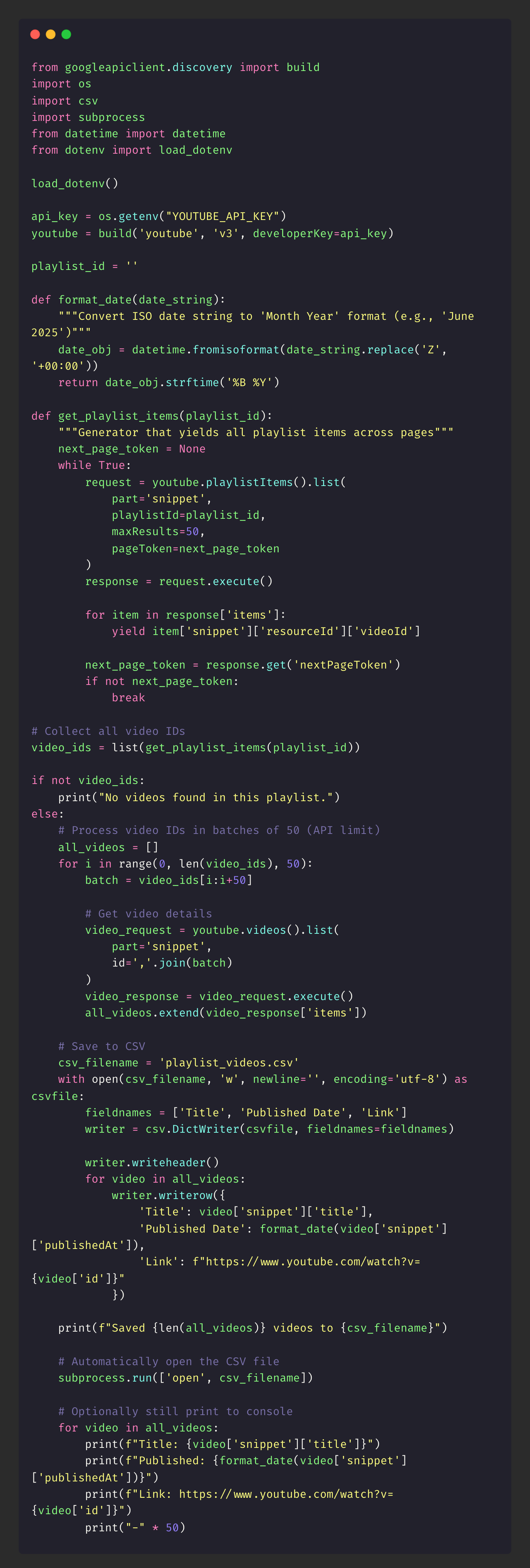
First, I used my Python knowledge, Claude, YouTube API, and some quick research to figure out how to build and customize my script. This took me about 15-20 minutes.
Next, I started to build out the script and within an hour I had everything working. What I have below works but moving forward some things I would change the amount of results. You can find the script on my GitHub under the yt-script repo.
The Result
This saved my client days of manually copying/pasting because they had almost 100 videos to go through. With my script it took seconds to pull in the important information they needed.
Building an Inventory Management System
The Issue
I own the strategy and develop systems for how our promotional products are used for 24 different business use cases. My current setup was admittedly all over the place and I knew I had to clean it up somehow. From the actual inventory tracker to all the doc files, I needed a way to combine everything and put it in one place for easy access.
The Solution
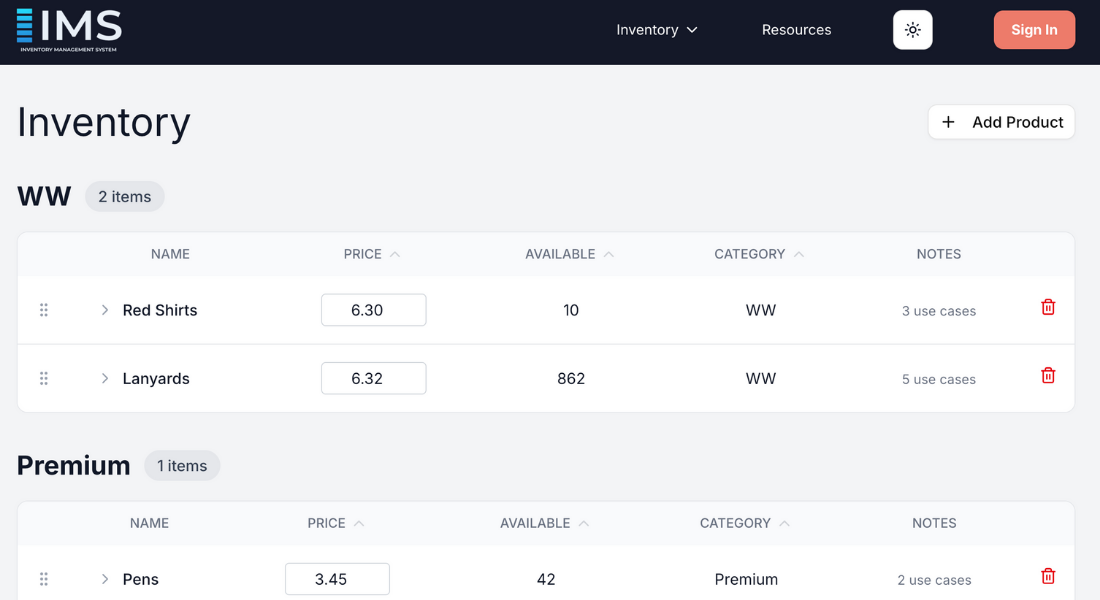
I absolutely love my working demo of the inventory management system because it was capable of scaling with our growth. This project was fun because I used a couple of new tools including Neon for database and Clerk for authentication.
First, I knew I wanted to use React and NextJS because I know these are perfect for use interfaces. I also just wanted an excuse to build with them!
Next, I didn’t know exactly how I wanted everything to look but I had an idea. Since I wasn’t entirely sure of how to code my idea, I knew I was going to have to rely on AI to assist with coding to make things move quickly. I just wanted to get my idea out and tweak things as I went.
I didn’t know much about databases but I read Neon was fairly simple and reliable for a project like this. I added Clerk because I thought it would be a nice touch to make things feel a bit more professional.
The Result
Using AI to help me mock up a demo saved me months! Unfortunately, it wasn’t published due to concerns about long-term ownership and maintenance if I were no longer involved. This was a common factor that often influenced company decisions around adopting new technical tools.
Feel free to check out the project in my GitLab inventory-management repo. Keep in mind this project isn’t 100% finished as it’s meant to be a working demo/draft.
Lighthouse Script
The Issue
I noticed our custom landing page for one of our ad campaigns was underperforming and after digging into the data I could see it was a website issue. Some of the main factors were page load speed, unnecessary JavaScript, and large image files. I wanted to check the historic data for the Chrome Lighthouse tool but that wasn’t possible since it only contains live data.
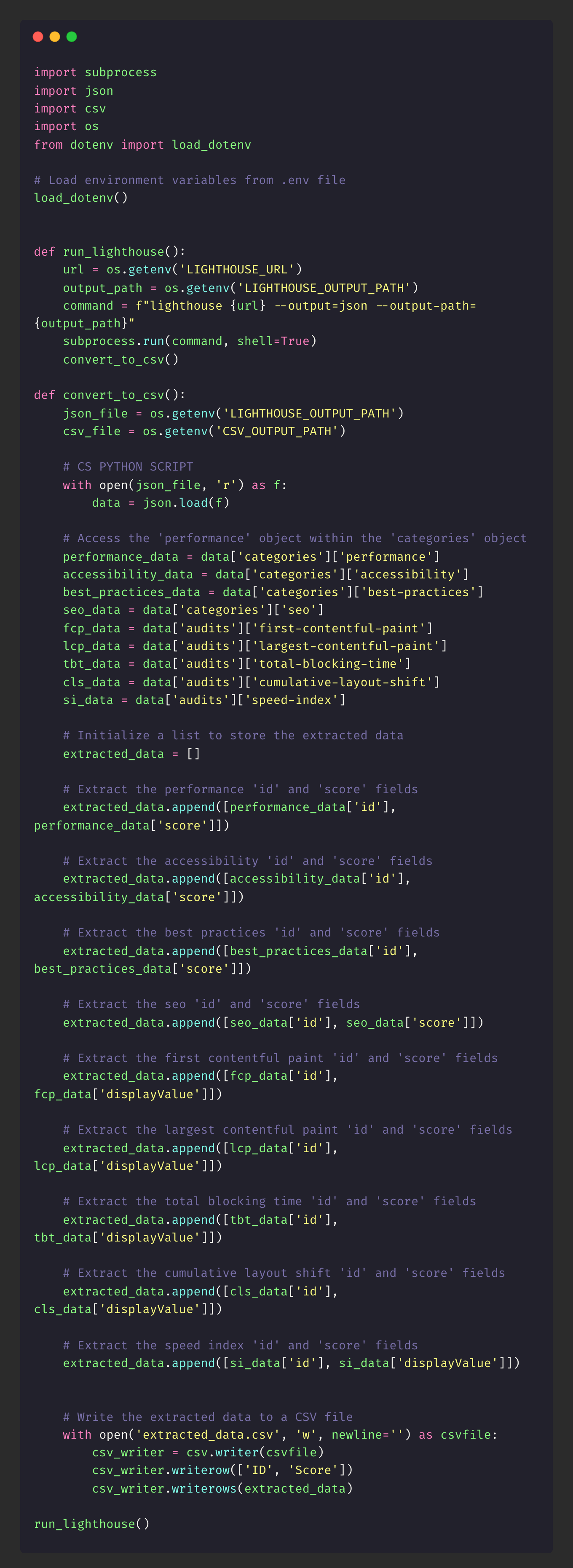
Initially I was downloading the reports and saving them in folders on Google Drive. This was so manual and I hated doing it. That’s when I decided to build a tool that runs the Lighthouse report, saves it, and updates a bar graph automatically for a visual that I could share.
The Solution
First, using my Python and Pandas skills, I was able to get up and running quickly. I eventually hit a point where I could keep hand coding or use AI to speed the process. I chose to use AI because I knew I wanted to finish this within 1-2 weeks.
Next, I needed to think through how I wanted the data to be created. Basically, the script runs, downloads only the metrics I’m looking for, cleans the data, and finally adds the new information to a bar graph using Jupyter Notebook. There’s some manual processes when using this, but as an initial script I think this works really well. Especially for all the visuals I get within seconds without having to manually build them out.
If you’re interested, you can find the project in my GitHub lighthouse-script repo.
The Result
This saved me time and reduced clutter on the company’s Drive. Not only did I have a great visual YoY that I could monitor progress with, I didn’t have a bunch of folders with random PDFs that I would never use again.
Attribution Using First Party Cookie
The Issue
My forms use a hidden field that will say something like googleads or facebookads so I can track attribution. For example, if a user clicks an ad from Google, lands on my custom landing page, and fills out the form I can see the user came from Google in my CRM. However, if the user doesn’t fill out the form, clicks around the website and 2-3 days later comes back and registers, I can’t see that they initially came from Google in my CRM. There’s a disconnect and by bridging that gap I would have a better idea of the effectiveness of our paid media campaigns and how they correlate to users who ultimately make a purchase.
The Solution
Admittedly this is still a work in progress at this time, but the idea is to create a first party cookie that stores UTM parameters and passes them into hidden fields upon a user filling out a registration form and saves the information to the user’s newly created profile.
Since this is still a work in progress I don’t have the final code at this time, but once it’s ready I’ll update this blog post.
The Result
As I mentioned before, this is still a work in progress. Hopefully, this will help me understand the effectiveness of my paid media campaigns. Yes, I can see conversion data in the Google Ads manager, but I can’t see if that user actually went on to make a purchase. Or if at some point in the journey they fell off. There’s a lot of other data points you could uncover as well. Hopefully this at least gives you an idea and if you go on to build something let me know!
Final Thoughts
In my opinion, I think learning how to code is a huge benefit and time saver. AI definitely helps speed up the process of building, but if you don’t know what questions to ask you might not get the proper answers you’re looking for. AI can speed things up but we still need our eyes and our creative minds to be the final touch.