Automating My Development Setup
I’ve really enjoyed working on static websites but one thing is becoming increasingly annoying, the set up. It’s funny because when I first started building websites I loved the whole set up process. From opening up a fresh terminal and starting a new Astro project to creating a new repo on GitHub. It felt almost like a super power, until I figured out a better way.
I noticed my website creation process was repetitive and in coding when something is repetitive the common term DRY (Don’t Repeat Yourself) comes up. I knew there had to be a better way so I started thinking through how I could solve this problem.
TLDR
I use an Astro template that I created and saved to GitHub which I use for all my new static website projects. The script I built automatically clones the repo, prompts the user for a new project name, and saves it to a specific folder on my desktop.
Still D.R.Y.
The Issue
During this time I was building a lot of static websites and my process was almost always the same.
- Open terminal
- Create Astro project
- Open and clean up the template
- Set up initial SEO for the site
- Create a new GitHub repo
- Git init, commit, and push to the new repo
I don’t remember exactly how long it took me to do all of that but it started to become more of a chore than something I got enjoyment out of.
|Don’t Repeat Yourself aka DRY in development means creating reusable functions and components to help make the code base more maintainable. |
I had this idea of DRY in the back of my mind and I decided to create a base Astro template that I only needed to clean up once as a general starting point for each new project. So maybe DRY is more about repetitive code than processes but I used that idea to solve my issue.
ZSH State of Mind
At this point I’m moving and grooving with my new base template, but now I start to think “What if I could automate more tasks?” In steps ZSH for the win. I haven’t worked with Bash and ZSH long enough to have a preference. My macbook came with ZSH so I use ZSH.
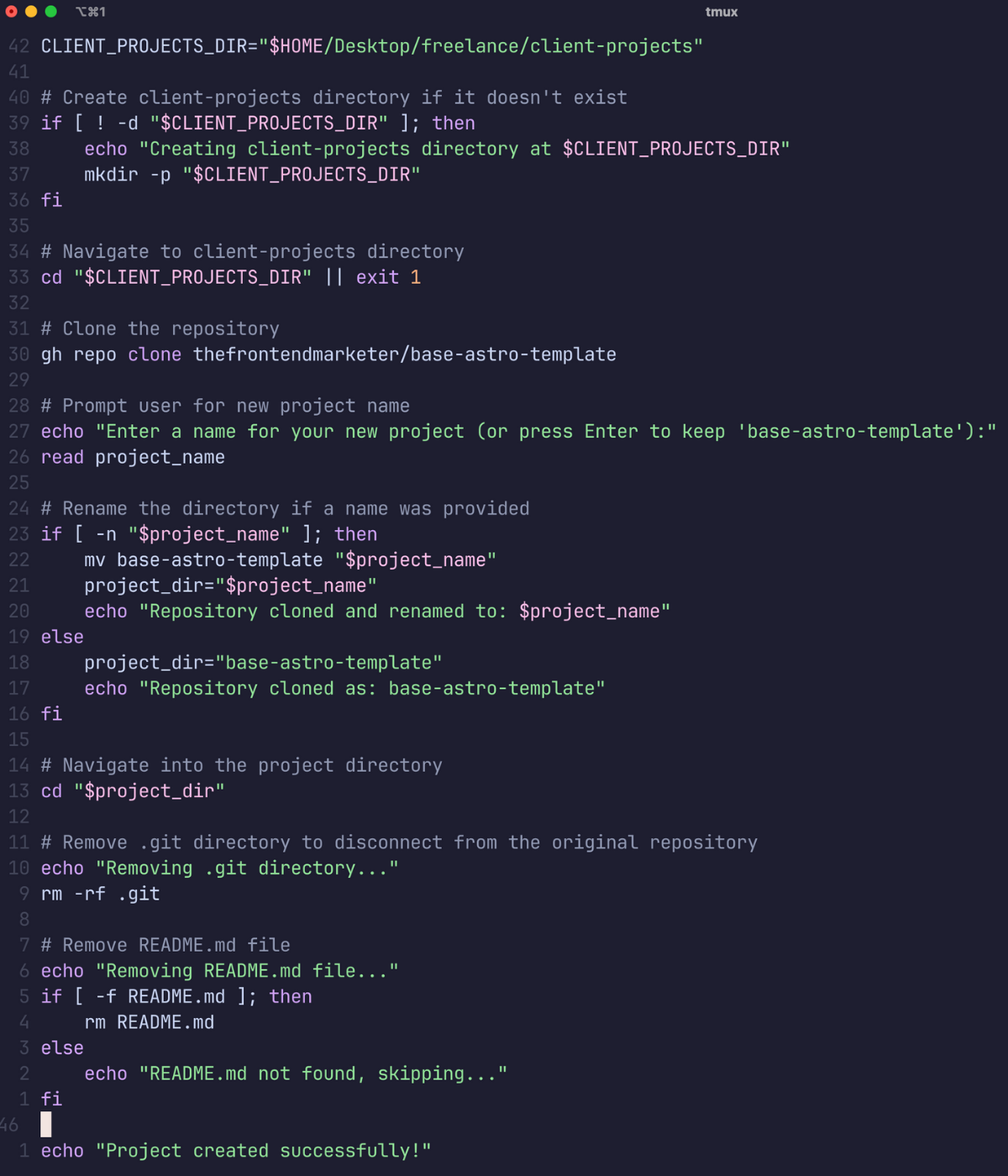
I used ChatGPT to help me create a script that would clone my repo, prompt me to rename the directory, and place it in a client folder on my desktop. Within seconds I had a new project ready to go and all I had to do was run a script in the terminal.
Original Process for Spinning Up a New Project – (MANUAL)
- Go to GitHub base-astro-template repo and copy https for clone
- In terminal navigate to desktop
- Run git clone base-astro-template
- Git history will be present so you have to delete
- Rename the folder mv base-astro-template new-project-name
- CD into new project
- Remove git history rm -rf .git
- Remove the README.md file with rm README.md
- Next git init, git add, git commit, git remote, and git push
- Open project in cursor
- Now pnpm install and then pnpm run dev
NEW Process for Spinning Up a New Project (w/ Script)
- Run this in the scripts directory: ./new-site-script.sh
I love looking at this old vs new process because it’s a visual reminder of how impactful scripts can be for automating your repetitive tasks.
I didn’t feel comfortable having the script initialize git or make the first commit because I feel like I still want that oversight. This might be something that I change later but for now I feel good that a lot of the manual work is done for me.
Enter the Script
Final Thoughts
Hopefully this gives you a clearer picture of what’s possible when you take the time to build workflows that actually work for you not against you.
I think this is also a good example of how knowing how to code comes in handy because I don’t think I would have known this was possible without some previous experience. I also think I might not have wanted to spend the time doing all of this if I didn’t already get some enjoyment from coding. That said, AI is here to help us build things like this but we need to make sure we’re giving it good instructions so the outcome is clean.